I found Katrina’s Quiet Money Method the way most of us find things these days — down a rabbit hole at some ungodly hour when I should have been sleeping. The promise of a structured, beginner-friendly system for making money in the markets while not being glued to a screen? As a mum with approximately zero spare time, that had my attention immediately.
So I bought it. I went through it. And here’s my completely unfiltered take — the good, the parts that didn’t work for me, and what I’m actually using right now.
First — Who Is Katrina and What Is This Method?
Katrina Marie Wiltshire is a mum of five — yes, five — who has been featured on Fox News and MarketWatch and describes herself as a seven-figure consultant and trader. So she’s not just someone who figured out a cute side hustle. She’s legit.
The full name of the course is actually “The QM Method — The No Social Media Method” and that subtitle tells you everything about who it’s designed for. This is built specifically for people — mostly mums — who are completely done with the world of posting every day, building audiences, recruiting, and the endless noise of social media marketing. No MLM energy. No pressure to show up online. Just systems running quietly in the background.
The method itself combines trading with automation — the idea being that you build something that generates income without it consuming your life. Which, honestly, is exactly what I was looking for when I found it.
The course covers a few different components — a recommended trading platform, a MetaTrader 4 bot, and a TradingView indicator. On paper it sounds like exactly what a time-poor beginner needs. And some of it genuinely is. But these are three very different things and my experience with each one was very different too.
What I’m testing right now…
The TradingView indicator — and it’s a 2-in-1.
This is the star of the show for me and I want to explain it properly because there’s more to it than I first realised.
The indicator that comes with the QM Method lives inside TradingView — the charting platform that virtually every serious trader uses — and it’s essentially two tools in one package.
The first part is the buy and sell labels. Clear, visual signals that appear directly on your chart telling you when a potential opportunity is showing up. No guesswork, no staring at lines wondering what they mean. It just shows you. Green label appears — potential buy. Simple. This is the part I’m currently using, trading manually off those signals, and it has been genuinely useful. As a beginner who is still building confidence reading charts, having a clean visual cue to guide my decisions has made a real difference to how I approach each session.
The second part — and this is where it gets really interesting — is the strategy component with buy and sell alerts. This part of the indicator can be automated. Set up your alerts inside TradingView, connect them to an automation tool, and the strategy can run without you needing to sit in front of a screen watching every candle. This is the “quiet” part of the Quiet Money Method and honestly, as a concept, it’s brilliant.
I haven’t used the automation side yet — right now I’m focused on understanding exactly what the indicator is doing and building confidence trading the labels manually before I hand anything over to automation. That feels like the right order to do things. But the fact that this pathway exists, inside a platform I already use and trust, is a genuine selling point. The settings can also be adjusted so your risk to reward can be adjusted inside the indicator. I set mine to 1:5 risk to reward in ticks.
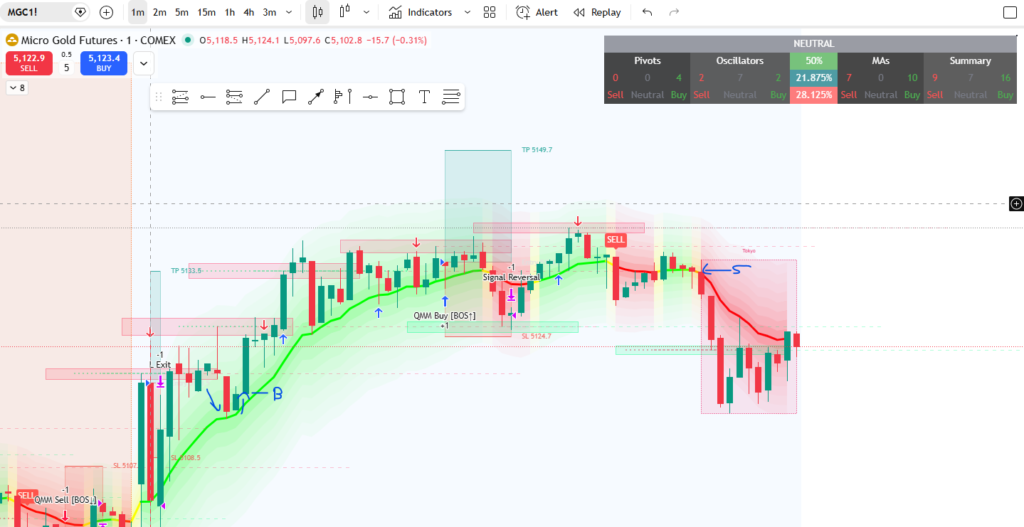
The indicate has buy and sell signals but also has signals with the risk to reward tool on it:
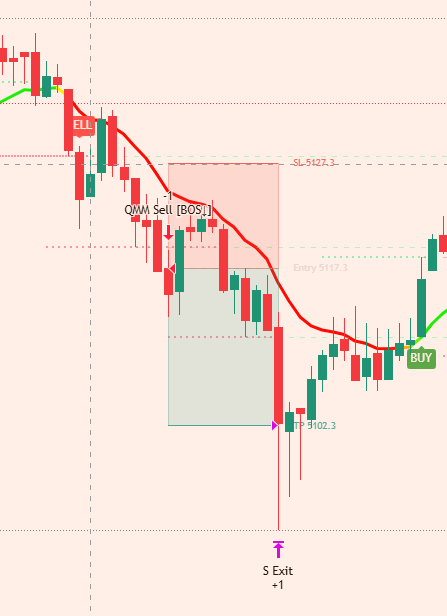
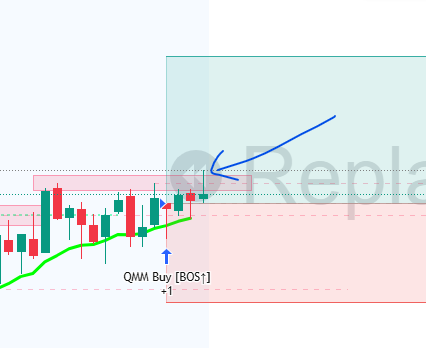
When to be cautious taking a trade though, is if you see a rejection block above the signal like here, which ended in a loss, so would need to invalidate and price close above the red rejection block to take the trade:
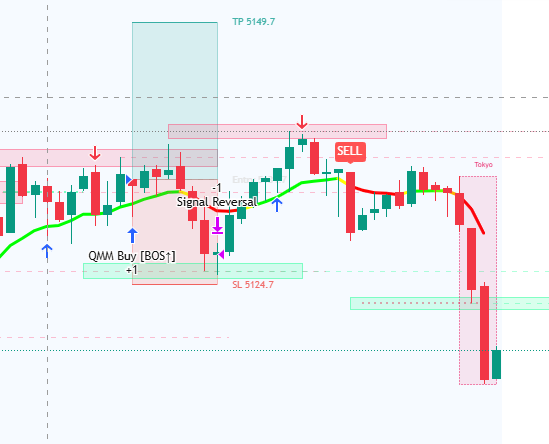
The indicator also give you a very clear visual when to stay in trades and up to date orders for sells and buys in the table:
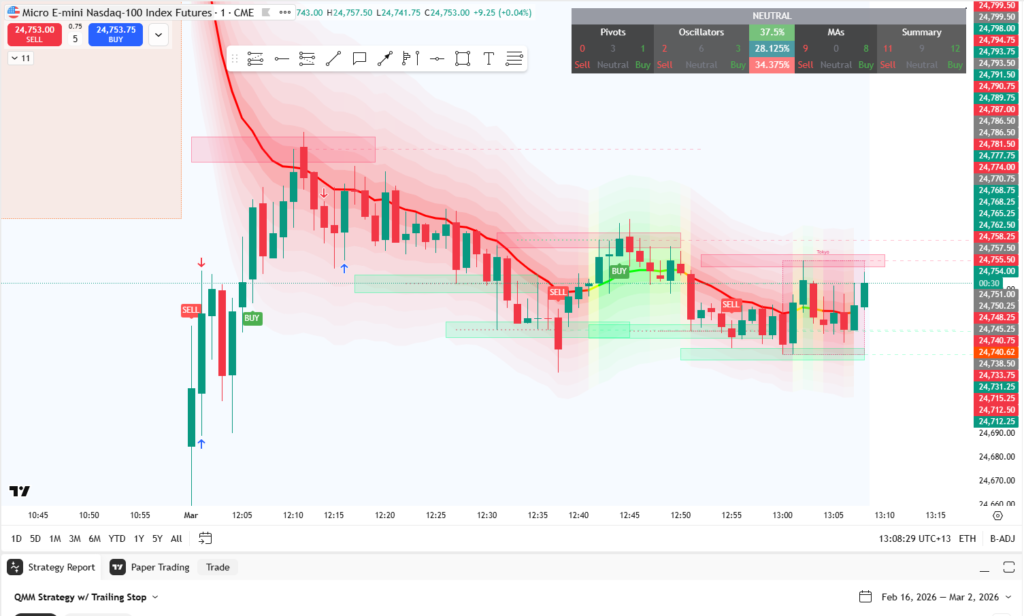
Another method is to use the buy and sell signals, wait for a pull back that rejects off the line and then get in:
The Parts That Didn’t Work For Me 🤔
Pocket Options — I couldn’t get comfortable with it.
The method recommends using Pocket Options as the trading platform and I gave it a genuine go. But I couldn’t shake one thing: Pocket Options is not regulated by the FCA or any of the major financial regulators that UK and EU traders would recognise.
For me personally, putting real money into an unregulated platform felt uncomfortable. The style of trading on Pocket Options — essentially predicting whether price will go up or down within a very short window — started to feel less like trading and more like gambling. And I didn’t get into this to gamble. I got into this to learn a real skill and build something sustainable.
I want to be really clear: this is a personal line for me, not a verdict on everyone who uses it. Plenty of people trade on Pocket Options and are perfectly happy with it. But I’d be doing you a disservice if I glossed over the regulation question. Please do your own research, understand what you’re signing up for, and make an informed decision before depositing any money.
The MetaTrader 4 bot — this is not a set-it-and-forget-it situation.
I think there’s sometimes an assumption that anything called a “bot” means you switch it on and walk away. That was not my experience with the MT4 bot at all — and I want to be upfront about that because if passive and hands-off is your main goal, you need to know this going in.
This component needed constant monitoring and managing. It wasn’t a case of setting it up and getting on with the school run — it required regular checking, active attention and hands-on involvement to keep it working properly. For a busy mum who specifically got into this because I don’t have time to watch screens all day, that was a dealbreaker for me personally.
It’s also worth noting that this is a completely separate component from the TradingView indicator — the two are not connected to each other. The indicator and its automation potential are one thing entirely. The MT4 bot is something else.
So… Should You Buy It?
Here’s my honest answer: it depends on what you’re actually looking for.
If you’re a beginner who wants clear, beginner-friendly visual guidance on TradingView without needing to be a chart expert — the indicator alone is genuinely worth exploring. The buy and sell labels are clean and easy to follow, and the fact that the strategy side can eventually be automated gives you a real growth path as your knowledge and confidence builds.
The “no social media” angle is also genuinely refreshing. If you’re coming from the world of network marketing or content creation and you’re exhausted by the constant need to post and perform, the philosophy behind this method is a breath of fresh air.
But if Pocket Options is not a platform you’re comfortable with — know that before you buy. And if you’re expecting the MT4 bot to run on complete autopilot — manage those expectations.
My honest approach has been to take what works — the TradingView indicator — use it in a way that suits where I am in my learning right now, and leave the rest until I’m ready. You might feel completely differently about the other components. That’s fine. The point is to go in with the full picture.
Ready to check it out for yourself? Here’s my affiliate link: 👉 HERE
Using my link costs you nothing extra and helps support this blog — which I genuinely appreciate. But only buy it if it sounds right for you after reading this. That’s the whole point of writing an honest review.
My Bottom Line
| My Take | |
|---|---|
| TradingView indicator — buy/sell labels | ✅ Really good, using it now |
| TradingView strategy — automatable alerts | ✅ Haven’t tried yet but excited to |
| Pocket Options platform | ⚠️ Unregulated — not for me personally |
| MetaTrader 4 bot | ⚠️ Needed constant managing, not passive |
| No social media angle | ✅ Love this philosophy |
| Overall | Worth exploring — but go in with eyes open |
Not financial advice. Always do your own research before depositing money into any platform. Check regulation status. Never invest more than you can afford to lose. I’m a trader in training, not a financial advisor
Disclaimer: This post contains an affiliate link. If you purchase through my link I may earn a small commission — at no extra cost to you. As always, my opinions are entirely my own. I’ll prove that in about 30 seconds