Four professional-grade TradingView indicators built for traders who are serious about reading the market the right way — without spending hours marking up charts.
👉 Get Access Now for $44.99 per month
The Problem Every Serious Trader Knows
You’re mid-session. Price is moving. You’re flipping between timeframes trying to remember where your levels are, hand-drawing the same zones you drew yesterday, missing entries because you were busy marking up your chart instead of watching it.
Sound familiar?
These four indicators fix exactly that. They bring the information you need directly onto your active chart — automatically — so you can focus entirely on making decisions.
The Indicators
🔄 SSMT — Sequential SMT
Catch intermarket divergences in real time.
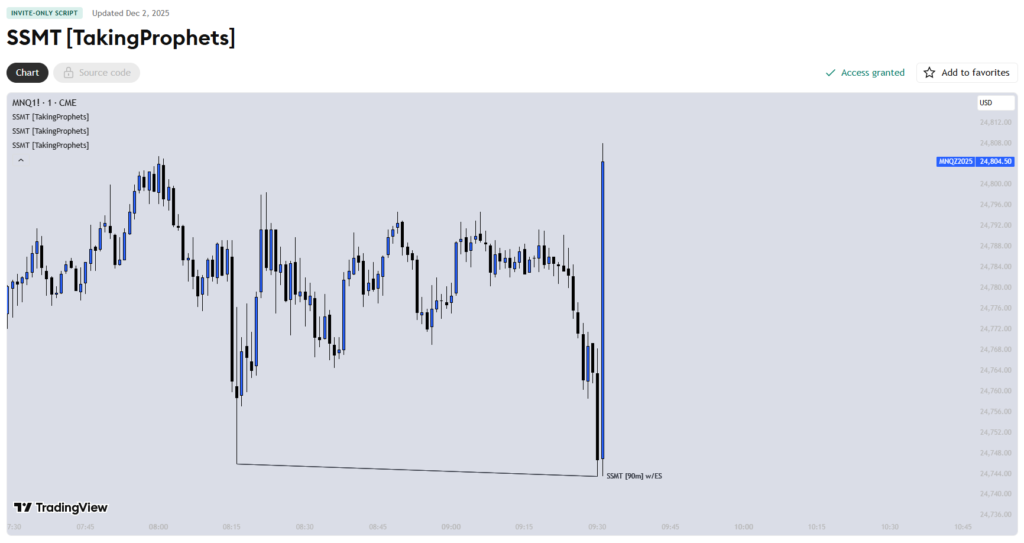
SSMT is a Quarterly Theory tool that visualises intermarket divergences automatically as they form. SMT divergence — when correlated pairs fail to make matching highs or lows — is one of the most powerful signals in institutional trading. Spotting it manually is slow and easy to miss.
SSMT does it for you, in real time, so you never miss the signal that changes the direction of your trade.
Perfect for: ICT and SMC traders who trade correlated pairs like NQ/ES, GU/EU, or Gold/DXY.
🔮 Prophet Model
HTF PDA & CISD Suite — your execution roadmap, automated.
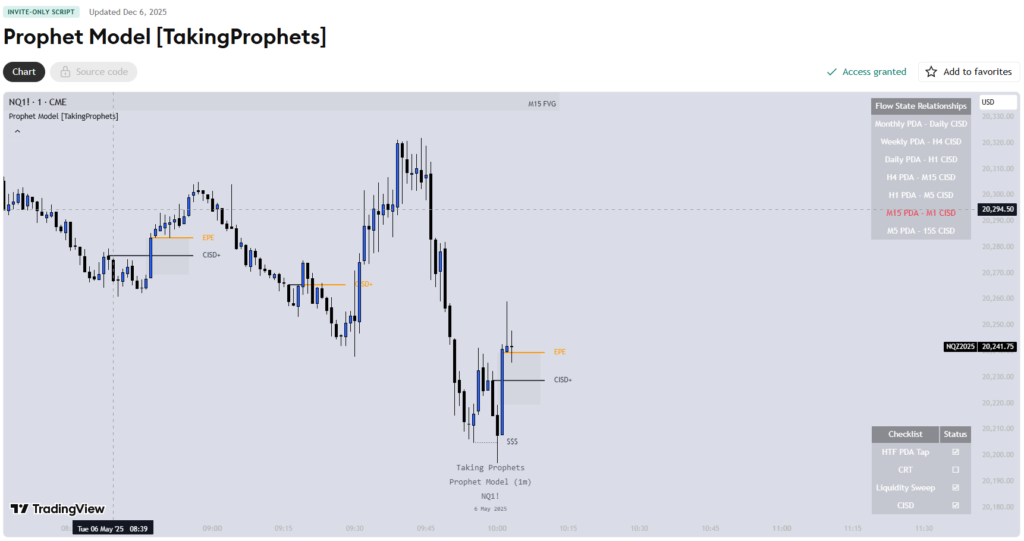
Prophet Model is a TradingView overlay that projects the nearest higher-timeframe Premium/Discount Array onto your active chart, detects CISDs (Change In State of Delivery) that follow a sweep or delivery from that PDA, and automatically plots your break-even and take-profit levels from objective extensions.
In plain English: it shows you where price is likely to go, marks when the shift happens, and tells you where to take profit — without you having to hand-mark a single level.
Perfect for: Traders who understand PDA concepts and want faster, more objective execution.
🛠️ Inner Circle Toolkit+
The all-in-one ICT/SMC suite.
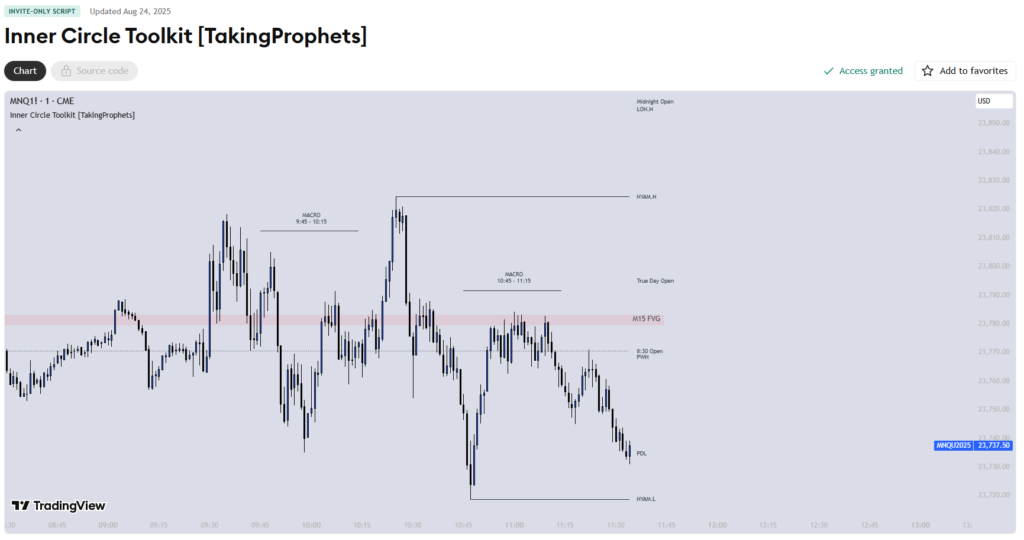
Inner Circle Toolkit+ is a comprehensive TradingView overlay that maps session structure and institutional flow directly onto your chart. Kill zones, liquidity levels, session highs and lows, market structure — all plotted automatically so you always know where the institutional money is likely to be moving.
Stop hand-drawing the same levels every day. Let the toolkit do the heavy lifting so you can focus on reading price.
Perfect for: ICT and SMC traders who want everything in one clean, organised overlay.
1st Presented Fair Value Gap Pro+
If you’ve spent any time studying ICT concepts, you know how quickly a chart can turn into a mess of boxes when you’re manually tracking Fair Value Gaps across sessions. The 1st Presented Fair Value Gap Pro+ by TakingProphets is built to solve exactly that.
What it does
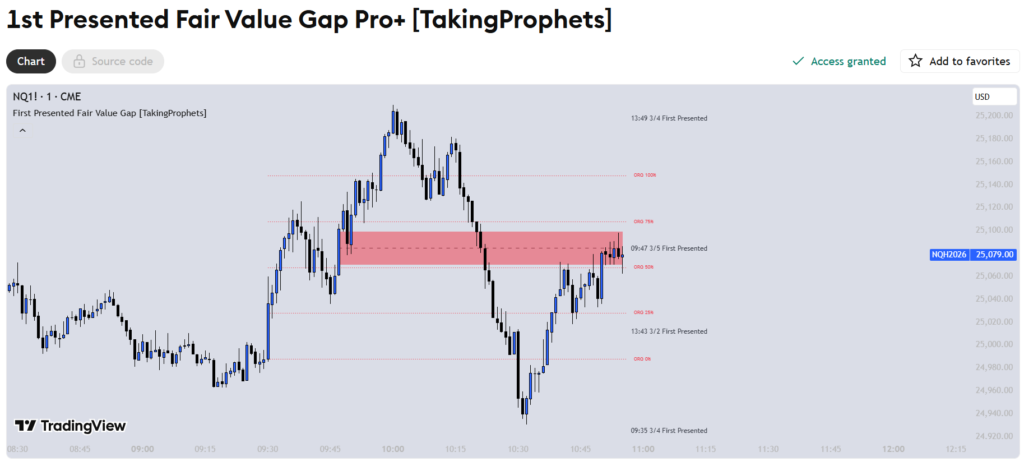
Rather than marking every FVG on the chart, this indicator focuses specifically on the first qualifying gap presented during two key windows each day — the A.M. window (9:32–10:00 AM New York time) and the P.M. window (1:32–2:00 PM New York time). These are the gaps that matter most for session-based traders, and this tool surfaces them without the noise.
What sets the Pro+ version apart
The free version covers the core concept, but this upgraded version goes significantly further. You get up to five A.M. gaps and five P.M. gaps tracked simultaneously, with a dynamic proximity-sorting system that keeps the most relevant gaps visually prioritised as price moves. It also includes built-in alerts for when price closes inside a visible gap, and ORG (Opening Range Gap) integration from ICT Gradients with full gradient level display.
Key features at a glance
- Session-based FVG detection for A.M. and P.M. windows
- Track up to 5 gaps per session with dynamic price-proximity sorting
- CE (Consequent Encroachment) lines and labels for every gap
- Optional current-day reset at the 9:30 NY open
- Minimum gap size filter to ignore insignificant imbalances
- ORG box with 0/25/50/75/100% reference levels
- Alerts when price closes inside any visible gap
Who it’s for
This tool is best suited for traders who are already familiar with Fair Value Gaps and session structure. It’s not a signals tool — it won’t tell you when to buy or sell. What it does is give you a clean, organised view of where the first imbalances formed each session so you can make your own read on how price is interacting with them.
ICT Gradients
One of the more frustrating things about trading on lower timeframes is keeping higher-timeframe reference points visible without cluttering your chart. ICT Gradients is a clean overlay built specifically for that problem — it takes the most relevant HTF PD Arrays and projects them onto your LTF chart as standardised quartile levels.
What it does
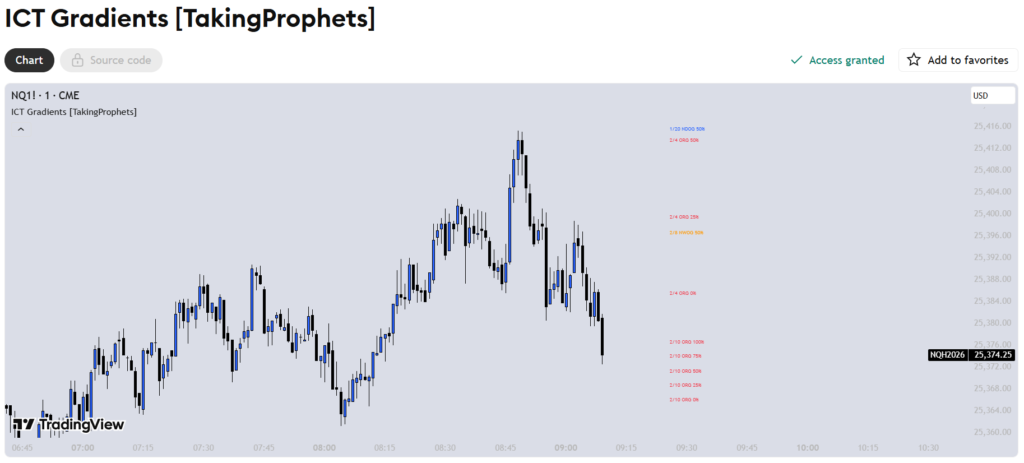
The indicator draws each PD Array as a box with five evenly-spaced gradient levels — 0%, 25%, 50%, 75%, and 100% — so you always have the full range framed the same way regardless of which array type you’re looking at. Labels can optionally include the formation date, so at a glance you know not just where a level is, but when it was created.
The four PD array types
- ORG (Opening Range Gap) — Captured using a 1-minute internal feed for precision. Drawn from the previous day’s close at 16:14 NY time to the 9:30 NY open.
- NDOG (New Day Opening Gap) — Triggers at the 18:00 NY reopen Monday through Thursday, using the prior daily close as one boundary and the reopening print as the other. Only stored if the gap is at least 10 handles.
- NWOG (New Week Opening Gap) — Same logic as NDOG but fires on Sunday’s 18:00 reopen, using the prior weekly close. Same minimum size filter applies.
- D-FVG (Daily Fair Value Gap) — Standard three-candle FVG logic on the daily timeframe. Stays active until price closes through the gap entirely — touching or mitigation alone won’t remove it, keeping the HTF reference visible longer.
How it stays clean
Rather than showing every stored array at once, the indicator lets you choose how many of each type to display at a time (1, 2, or 3). It then selects which ones to show based on one of two detection modes: Proximity, which prioritises arrays whose 50% midpoint is closest to current price, or Most Recent, which simply shows the most recently formed gaps. An IPDA lookback window prunes anything outside your chosen range automatically.
Customisation
Every array type has completely independent styling — box colour, fill on/off, border on/off, per-level colour and line style, and individual toggles for each of the five gradient levels. There’s also a debug panel that displays a live summary of how many arrays are stored and visible at any given moment.
Who it’s for
This is a tool for traders already working within an ICT or PD Array framework who want a structured, consistent way to reference HTF gaps while executing on lower timeframes. It doesn’t generate signals — it just keeps the levels you care about visible and organised.
INDICATOR REVIEW · TradingView Tools
CRT
by TakingProphets
Most HTF context tools give you one thing — a candle projection, or an SMT divergence signal, or some live levels — and leave you to mentally stitch them together yourself. CRT by TakingProphets takes a different approach, combining all three into a single pipeline that produces one explicit context state rather than a pile of separate overlays to interpret.
What it does
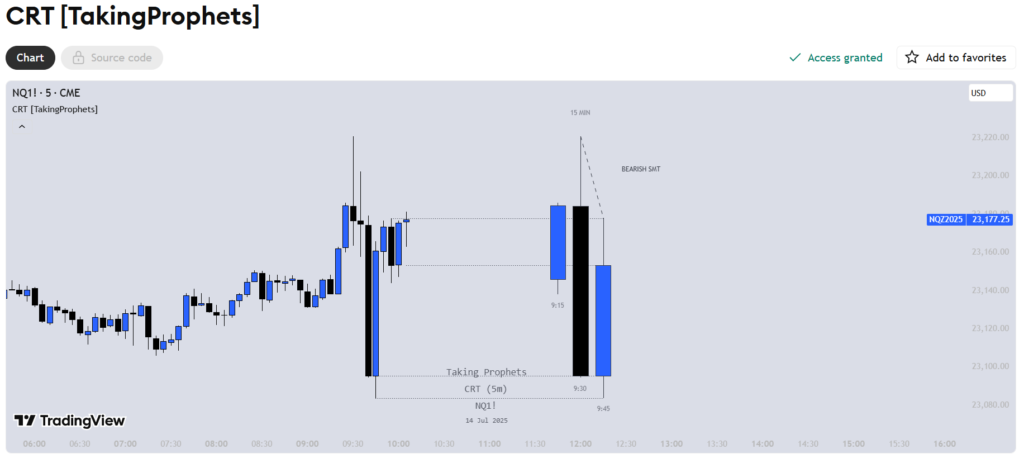
The indicator projects the last three higher-timeframe candles onto whatever lower timeframe you’re trading on, then runs two checks against that HTF window — a Candle Range Theory pattern test and an SMT divergence comparison against a correlated instrument. The result isn’t just a collection of annotations; it’s a labelled context state that tells you where things stand right now.
Candle Range Theory (CRT)
CRT is a three-bar HTF pattern centred on a failed continuation. A bearish setup occurs when the middle candle trades above the prior candle’s high but closes back inside its range without breaking the low — a sweep that goes nowhere. The bullish version is the mirror: a push below the prior low that closes back inside range without breaking the high. The indicator evaluates these conditions on actual HTF bars, not lower-timeframe approximations, and distinguishes between a pattern that is still forming versus one that has confirmed on the close.
SMT divergence
Alongside the CRT check, the tool compares swing extremes between your chart’s instrument and a correlated symbol you specify. It runs this in two modes simultaneously — historical (comparing the two most recently closed HTF bars) and real-time (comparing the last closed bar against the current forming one). A bearish SMT occurs when one instrument makes a higher high and the other doesn’t; bullish is the reverse. This gives you a cross-market stress test of whatever bias the CRT is suggesting.
How the context states work
Because both modules share the same HTF time base, the tool can sequence them into a single read:
- Neutral — no CRT present; SMT may still add context
- CRT Forming — the HTF push is underway, pattern not yet confirmed
- CRT Confirmed — the failure pattern has locked in on the close
- CRT + SMT Aligned — both point the same direction; strongest confluence
- CRT vs. SMT Mixed — bias exists but intermarket is disagreeing; treat levels as potential fade zones
Live OHLC levels
The current HTF Open, High, Low, and Close are extended as horizontal reference lines — anchored deterministically so the Open always marks the first bar of the HTF candle and the High/Low mark their first occurrence. These become the decision rails for judging follow-through, failure, or targets within the identified context.
Alerts
Built-in alerts fire on state transitions rather than arbitrary conditions: CRT forming, CRT confirmed, historical SMT, and real-time SMT. Alert messages include the HTF in use and the current context state, so you know immediately whether CRT and SMT are aligned or in conflict.
Who it’s for
This is for traders who use HTF candle structure and intermarket relationships as part of their analysis — particularly those working within an ICT framework. It won’t tell you what to do, but it gives you a structured, integrated read on what the higher timeframe is doing while you’re watching a lower one.
Why These Together?
Each indicator solves a different problem — but together they form a complete, layered system where nothing overlaps and nothing is missing.
- CRT takes that HTF context further, identifying failed continuation patterns and running a live SMT cross-check to give you an explicit directional bias
- SSMT catches intermarket divergences in real time, so you know when correlated pairs are disagreeing and a move is likely brewing
- ICT Gradients keeps your key HTF PD Arrays — ORGs, NDOGs, NWOGs, and Daily FVGs — framed as clean quartile levels directly on your execution chart
- 1st Presented Fair Value Gap Pro+ zeroes in on the session-specific gaps that matter most, tracking the first A.M. and P.M. FVGs with dynamic proximity sorting so the relevant levels stay front and centre
- Prophet Model maps your PDA levels and handles execution — detecting CISDs, plotting break-even, and calculating take-profit levels automatically
- Inner Circle Toolkit+ ties it all together with session structure and institutional flow — kill zones, liquidity levels, and market structure marked up without you lifting a finger
Together they cover context, bias, confirmation, key levels, session structure, and execution. Everything you need. Nothing you don’t.
What Traders Are Saying
“Tools like these completely changed how I approach my sessions — less chaos, more clarity.”
“Once you stop hand-drawing everything and let the indicators do it, you realise how much mental energy you were wasting.”
“The HTF context overlay alone is worth it. I can’t imagine trading without it now.”
Get Access Today
These indicators are available now through Whop. One link gets you in.
👉 Get All Indicators Here
Affiliate disclosure: This page contains an affiliate link. If you purchase through my link I may earn a small commission at no extra cost to you. I only recommend tools I genuinely believe in.
Frequently Asked Questions
Do I need a paid TradingView account? A free TradingView account works to get started, but a paid plan (Pro or above) is recommended to get the most out of multiple indicators running simultaneously.
Are these suitable for beginners? They’re most valuable once you have a basic understanding of ICT or SMC concepts. If you’re brand new to trading, spend some time learning the foundations first — then these tools will make much more sense and be far more powerful.
What markets do these work on? All of them — forex, indices, crypto, commodities. If it’s on TradingView, these indicators work on it.
Do they work on all timeframes? Yes. While they’re designed to bring higher-timeframe context to your active chart, they work across all timeframes and are particularly powerful on the 1-minute through 15-minute charts for day trading.
Not financial advice. Trading involves risk. Never trade with money you cannot afford to lose.