TradingView is Your New Best Friend (No, Seriously)
01 — What Even Is This Thing?
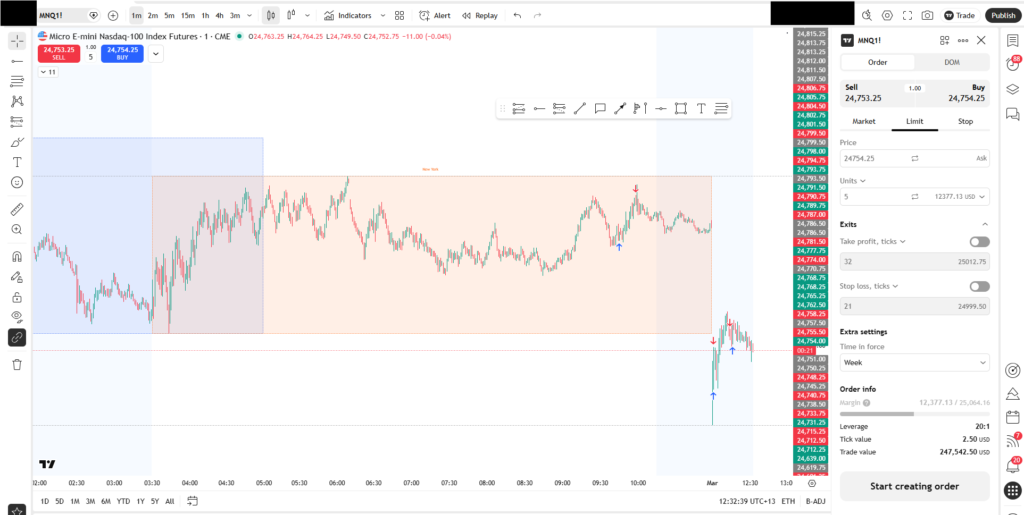
Okay, imagine if Google Maps and Excel had a baby, and that baby was obsessed with stocks. That’s basically TradingView. It’s a web-based charting platform where you can watch price move in real time, draw on charts like a maniac, and use hundreds of technical indicators to try to predict what happens next.
The best part? The free plan is genuinely really good. You don’t need to pay a dime to get started and learn the fundamentals. And it works in your browser — no sketchy downloads required.
💡 TradingView is used by over 50 million traders worldwide. From teenagers learning candlestick patterns to professionals trading eight-figure accounts — everyone’s on it. You’re in good company.
02 — What Can You Actually Do With It?
A lot. Like, almost too much. Here’s the stuff that matters when you’re just getting started:
📊 Real-time Charts — Watch price move tick by tick. Choose from candlestick, bar, line, Heikin-Ashi, and more chart types.
✏️ Drawing Tools — Trendlines, Fibonacci retracements, horizontal levels — draw directly on the chart to spot patterns.
📡 Hundreds of Indicators — RSI, MACD, Bollinger Bands, VWAP — load them with one click. No coding required (but you can code your own).
🌍 Every Market — Stocks, crypto, forex, futures, indices — it’s all here. Switch between them instantly.
💬 Social Ideas Feed — See chart setups shared by other traders. Great for learning how others think about the market.
🔔 Price Alerts — Set alerts for specific price levels. TradingView pings you so you don’t have to stare at charts 24/7.
03 — Your First 30 Minutes (Don’t Panic)
The interface looks intimidating at first — there are so many buttons. But you only need to know a handful of things to start. Here’s your zero-to-chart checklist:
- Go to tradingview.com and create a free account. The signup takes 30 seconds. Just use Google. Don’t overthink it.
- Type a ticker in the search bar. Try
SPY(S&P 500 ETF) orAAPL. Hit Enter. Boom — chart. - Switch to the 5-minute timeframe. In the toolbar at the top, you’ll see buttons like
1D,1H,5. Day traders mostly live in 1-minute to 15-minute charts. - Add your first indicator. Click the “Indicators” button and search for VWAP. It’s the single most useful day trading indicator. Add it and watch the blue line appear on your chart.
- Draw a horizontal line. Press
Hon your keyboard, then click a price level. That’s a support/resistance line — you’ll use these constantly.
04 — The Jargon, Decoded
Day trading has its own language and it sounds way more complicated than it is. Here’s a quick translator for the stuff you’ll encounter inside TradingView:
Candlesticks — Each candle represents a time period. A green candle means price went up during that period. A red candle means it went down. The thick part is the open-to-close range. The thin “wick” sticking out shows how far price traveled beyond that range. That’s it. That’s candlestick charts.
Support & Resistance — Price tends to bounce off certain levels again and again. A support level is a floor where buyers show up. A resistance level is a ceiling where sellers pile in. You’ll spend a lot of time drawing these on TradingView.
Volume — Those little bars at the bottom of your chart? That’s volume — how many shares traded in each candle. High volume = lots of people care about this price. Low volume = traders are napping. Never ignore volume.
VWAP — Volume Weighted Average Price. Think of it as the “fair price” of the day. If price is above VWAP, bulls are in control. Below? Bears. Day traders use this line like a compass.
05 — TradingView Tricks Beginners Miss
These features will save you hours of confusion. Bookmark this section.
⭐ Paper trading mode is built in. TradingView has a free simulated trading account. Practice buying and selling with fake money before risking a dollar. Use it. Please.
⭐ Save your chart layouts. Once you set up your indicators just the way you like them, save the layout. You’ll come back to a clean setup every time instead of rebuilding from scratch.
⭐ Use the Replay feature to practice. Hit the “Replay” button and TradingView will rewind a chart to a past date. You can practice reading price action on real historical data. Free endless reps.
⭐ The Pine Script editor is your superpower. TradingView has its own coding language called Pine Script. Once you’re comfortable, you can write custom indicators and strategies. It’s easier than you think.
⭐ Right-click everything. Seriously. Right-click on a candle, a line, an indicator. The context menus are full of useful options most beginners never discover.
06 — The Real Talk
TradingView won’t make you money. But it’s where you learn to.
Here’s something the trading influencers won’t tell you: the platform doesn’t matter nearly as much as your process. TradingView is just a window into the market. What you do with that window — how you study, how you practice, how you manage risk — that’s what determines outcomes.
The good news is that TradingView gives you everything you need to learn properly. Use the replay feature obsessively. Study how price behaves around levels. Watch how volume precedes big moves. Read other traders’ published ideas — not to copy them, but to see how experienced traders think.
Go slow. Be boring. Take notes. The market will still be there when you’re ready.
🚀 Your Next Steps:
- Create your free TradingView account today.
- Spend one week just watching charts — no trading, just observing.
- Learn three setups: VWAP reclaim, support bounce, breakout.
- Paper trade for at least 30 days before touching real money.
You’ve got this. Now go chart something. 📈
Not financial advice. Past performance ≠ future results. Please don’t YOLO your rent money.